
Retropa / CRT filters
Why old games look better through a CRT filter.
Retro games were drawn for tube televisions, not for sharp LCD pixels. This guide explains what a CRT added to the picture (scanlines, a phosphor mask, glow and soft edges), what integer scaling has to do with it, and how to bring that look to an iPhone or iPad.

Free to download. Optional in-app purchases. iOS 18 or later.
Pixel art was drawn for a tube
A CRT draws the picture with an electron beam that sweeps the screen line by line and lights coloured phosphors. The beam has a soft, rounded profile, so neighbouring pixels blend a little, bright areas bloom and dark gaps open between lines. Artists of the 8- and 16-bit eras worked on those screens and leaned on the blending: dithering melts into new shades, and hard steps on an edge read as smooth curves. On a modern display every pixel becomes a sharp square, which is why the same game can look blockier than you remember.
- Dithered patterns were meant to blend into a single shade.
- Home consoles of the era drew about 240 lines, so every line of the game was a visible stripe on the tube.
- A filter adds no detail; it changes how the existing pixels are drawn.
Scanlines
Those consoles sent the same set of lines on every frame, so the lines in between stayed dark. The dark gaps are the scanlines people remember. A scanline filter darkens stripes between the rows of game pixels. A good one also lets bright lines grow wider than dark ones, the way a real beam spreads with brightness; a plain overlay of black stripes only dims the whole picture, which is why simple scanline filters can look flat.
- Bright lines grow wider and dark lines thinner: that is what makes scanlines look alive.
- Even stripes need the right relationship between game lines and display pixels; see integer scaling below.
- Handhelds such as Game Boy and Game Boy Advance had LCD screens and never showed scanlines.
Phosphor masks: shadow mask, slot mask and aperture grille
A colour tube puts a mask behind the glass so each of its three beams reaches only its own red, green or blue phosphor. Many televisions and monitors used a shadow mask of round holes, which leaves dots in a triangle pattern; many others used a slot mask of short vertical slots. Sony's Trinitron used an aperture grille: unbroken vertical stripes held in place by one or two thin wires, which gave a brighter picture. Up close, the mask is the fine colour texture of a real tube, and a filter recreates it at the scale of display pixels.
- Shadow mask: dots in triangles, soft and even.
- Slot mask: short vertical slots, typical of living-room televisions.
- Aperture grille (Trinitron): continuous vertical stripes, bright and crisp.
Glow, curvature and composite blur
The rest of the look is optional. Bright phosphors bloom and spill light around them (halation). Older tubes bulge outwards and darken towards the corners. Many consoles reached the television through composite video or RF, which smears colour sideways; some games even used that blur to fake transparency. Filters let you add each of these on its own, and most people keep them subtle.
- Bloom and halation: light spilling around bright areas.
- Curvature and vignetting: the bulge and the darker corners of the glass.
- Composite blur: horizontal colour bleed from the video signal, not the tube.
What integer scaling is, and why CRT filters care
Integer scaling enlarges each game pixel by a whole number, such as 3x or 4x, so every pixel covers the same number of display pixels. It keeps pixel edges and simple scanlines even, but it rarely fills the screen: a 240-line game on a phone often leaves a band unused. At a scale between whole numbers, an overlay drawn per game pixel lands on uneven display pixels, and scanlines turn into a pattern of thick and thin stripes. Retropa's advanced filters work from the real output area instead, computing each display pixel from the footprint of the game pixels beneath it, so they stay even without integer scaling.
- Integer scaling: crisp and even, but often leaves part of the screen unused.
- A simple overlay at a non-integer scale: uneven stripes and shimmering text.
- Filtering from the output area: even structure at any size, with the aspect ratio kept.
A real CRT television or a filter?
A good CRT is still the reference: the picture arrives without processing, and light-gun games need one. It is also heavy, hard to find in good condition and fixed to one room. A filter gives you most of the look wherever you play, at the size of the screen in your hand, and you can switch it off when small text matters. A phone screen packs enough pixels to draw a mask and scanlines in fine detail.
- Light-gun games need a real CRT; no filter changes that.
- Heavier filters ask more of the GPU and use more battery.
- Compare with the filter off now and then, so you know what it adds.
Getting the look in Retropa
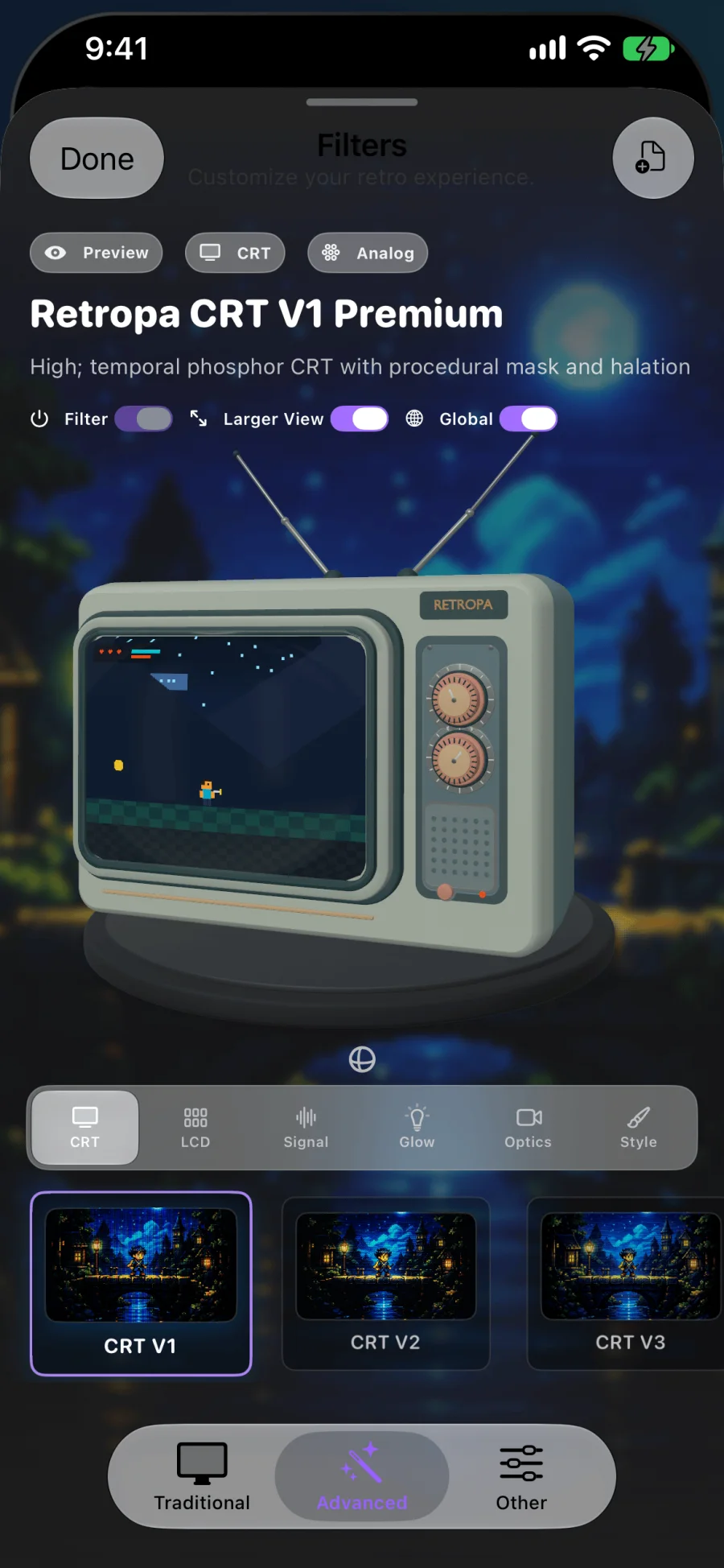
Retropa's Filters screen has two groups. Traditional holds the light presets, CRT Lite, Scanline and LCD Grid. Advanced holds presets that model the display itself, such as Retropa CRT V4 and Trinitron V1 for tubes and Retropa DMG for the original Game Boy's LCD. Look at the unfiltered picture first, then compare presets at the size and orientation you really play in.
CRT filter questions
What does a CRT filter do?
It redraws the game picture the way a tube television showed it: dark gaps between lines, a fine colour mask, soft edges and glow. It changes how the existing pixels are drawn and does not raise the game's resolution.
Did old TVs really show scanlines?
With home consoles, yes: they sent about 240 lines per frame, so the lines in between stayed dark and showed as stripes. Handhelds such as Game Boy and Game Boy Advance had LCD screens and never had them; an LCD filter suits those better.
Do I need integer scaling for a CRT filter?
Simple overlays look even only at whole-number scales. Retropa's advanced filters compute each display pixel from the real output area, so they stay even without integer scaling and can fill the screen while keeping the aspect ratio.
What makes the Trinitron look different?
Trinitron tubes used an aperture grille of continuous vertical stripes instead of dots or slots, which gave a brighter picture with a fine vertical texture. Retropa's Trinitron V1 preset models that grille.
Does a CRT filter slow games down or drain the battery?
Heavier presets ask more of the GPU, so they can use more battery, especially on older devices; light presets cost little. If a game stutters, compare with the filter off and pick a lighter preset.
Are CRT filters free in Retropa?
The light presets, CRT Lite, Scanline and LCD Grid, are free. Advanced presets such as Retropa CRT V4, Trinitron V1 and Retropa DMG need Retropa Plus, and the app shows which presets qualify.