
Retropa / N64 emulator
Nintendo 64 games on iPhone, free.
Retropa plays Nintendo 64 games on iPhone and iPad at full speed, in the picture's true 4:3 shape. The touch screen gets an analog stick, a C pad and a Z key, and a controller works like an N64 pad. Bring your .z64, .n64 or .v64 files, no BIOS needed. N64 is free, with no ads.

Free to download. Optional in-app purchases. iOS 18 or later.
Full speed, in the right shape
N64 games run at their full speed with steady motion, and sound stays in step with the picture. The picture keeps the 4:3 shape it had on a TV, so nothing is stretched or squashed, and it is drawn sharp at your screen's own size.
- On an iPhone 12 Pro, the games in the list below run at full speed through long sessions.
- Games that need the Expansion Pak, such as Donkey Kong 64 and Majora's Mask, have it built in.
- Screen filters, shells and the library work as they do for every other system.
Running in Retropa
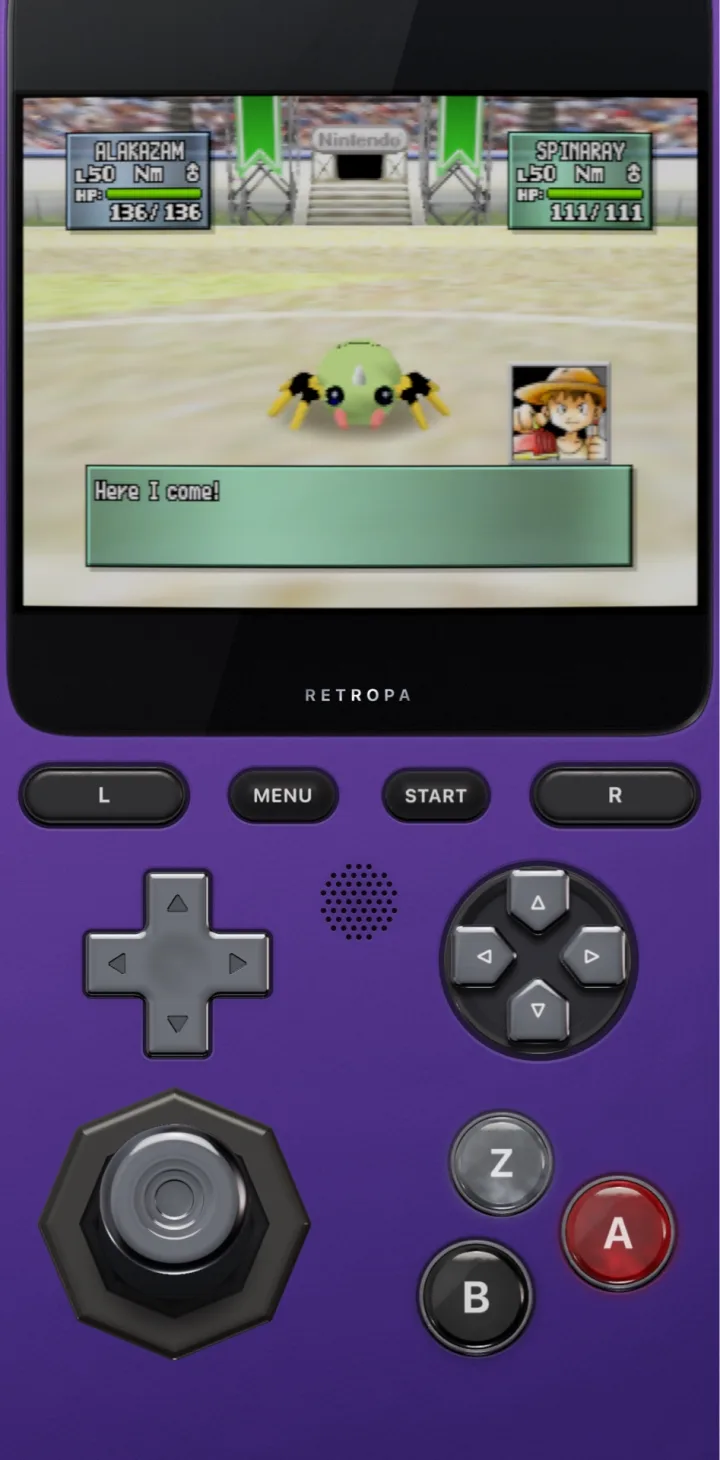
Captured in Retropa on an iPhone: a battle as it plays, with the N64 keys around it.
Compatibility: games we have played at length
These games have been played at length on iPhone and run excellently in Retropa, from the start screen through long play sessions. The list grows as we test more games.
| Game | Genre | Experience |
|---|---|---|
| Donkey Kong 64 | Platformer | Excellent |
| Duke Nukem 64 | First-person shooter | Excellent |
| Mario Kart 64 | Racing | Excellent |
| Pokémon Stadium 2 | Turn-based battles | Excellent |
| Star Fox 64 | Rail shooter | Excellent |
| Super Mario 64 | Platformer | Excellent |
| The Legend of Zelda: Majora's Mask | Action adventure | Excellent |
| The Legend of Zelda: Ocarina of Time | Action adventure | Excellent |
Free, with no ads
N64 is free in Retropa, like the handheld and console systems before it. There is no trial, no timer and no ad. Retropa itself is free to download.
An analog stick, a C pad and Z on the touch screen
The N64 keys are laid out for portrait and landscape. The stick is analog: push it a little to walk and all the way to run, and it starts from wherever your thumb lands near it.
- The four C buttons sit together as one pad above A and B, so the camera is a thumb's slide away.
- Z sits beside A and B, and L and R are on the shoulders.
- The stick, the D-pad and the C pad can each wear their own style in Looks.
A controller plays like an N64 pad
With a controller, the left stick is the N64's analog stick, the right stick presses the C buttons and the left trigger is Z. A and B are on the face buttons, and every button can be moved in the mapping center.
- The left stick stays analog and never presses the D-pad, so walking and running feel as they should.
- Xbox, PlayStation, Nintendo and MFi controllers are all supported.
Files: .z64, .n64 and .v64
Import an N64 game the way you import any other: from Files, through Open In, from a computer over the Wi-Fi Portal, or inside a ZIP or 7Z.
| File | What it is |
|---|---|
| .z64 | A cartridge image in the console's own byte order, the most common kind |
| .n64 | A cartridge image with its bytes swapped in fours |
| .v64 | A cartridge image with its bytes swapped in pairs |
- All three kinds play the same and find the same cover.
- No BIOS is needed.
Save states and in-game saves
Save states work as on every other system: save anywhere, let autosaves keep your place, and pick a state from the timeline by its thumbnail. Saves a game makes itself are kept for that game.
- Rewind is not available for N64.
N64 questions
Is the N64 emulator free?
Yes. N64 is free in Retropa, with no trial, timer or ads. Retropa is free to download from the App Store.
Do N64 games run at full speed on iPhone?
Yes. The games in the compatibility list, from Super Mario 64 and Ocarina of Time to Mario Kart 64, run at full speed through long sessions on an iPhone 12 Pro.
Do I need to jailbreak my iPhone to play N64 games?
No. Retropa is an App Store app for iPhone and iPad with iOS 18 or later. It installs like any other app, with no jailbreak, sideloading or computer.
Which N64 files can I import?
.z64, .n64 and .v64 cartridge images, on their own or inside a ZIP or 7Z. Retropa does not include any games.
What is the difference between .z64, .n64 and .v64?
They hold the same cartridge data in a different byte order: .z64 keeps the cartridge order, .v64 swaps each pair of bytes and .n64 reverses each group of four. Retropa reads all three as they are, so there is nothing to convert.
Do I need a BIOS for N64?
No. N64 games start without any BIOS file.
How does the analog stick work on the touch screen?
The on-screen stick is analog: a small push walks and a full push runs. It starts from wherever your thumb lands near it, and lets go to the centre when you lift your thumb.
Can I use a controller?
Yes. The left stick is the N64 stick, the right stick presses the C buttons and the left trigger is Z. You can move any button in the mapping center.
Can I play N64 games on iPad?
Yes. Retropa runs on iPad with iOS 18 or later, with N64 keys laid out for the larger screen, and a controller works there too.
Nintendo 64, Super Mario 64, The Legend of Zelda, Mario Kart, Star Fox and Donkey Kong are trademarks of Nintendo. Pokémon Stadium 2 © Nintendo, Creatures, GAME FREAK, The Pokémon Company. Duke Nukem © Gearbox Software. Game names belong to their owners. The picture is captured in Retropa to show the game running; owners can ask for their removal at the address below.